Midjourney V8.2
Midjourney V8.2 Prompt Guide: Tips and Examples
Midjourney.ing9 min read
Contents+
Midjourney V8.2 continues the V8 family direction: faster generations, stronger prompt adherence, and native ~2K HD output. For creators, that shifts the job of prompting from writing a mood sentence to drafting an iterable design brief—clear structure beats adjective stacking when you need repeatable results.
This guide is a hands-on Midjourney V8.2 prompt playbook: skeleton structure, parameter pairings, 8 copy-ready examples, and a mistake checklist. New to the platform? Start with Getting Started with Midjourney: Your First Complete Generation Guide. Need a full parameter list? See Midjourney V8.1 Parameter Cheatsheet: –hd –raw –chaos –stylize (V8.2 follows the same current parameter logic).
How V8.2 Prompts Differ from V8.1 and V7
| Dimension | V7 habit | V8.1 / V8.2 recommendation |
|---|---|---|
| Quality flags | --q 2 / --q 4 |
--q not supported—use SD→HD instead |
| Exploration cost | Rely on many rerolls | SD for fast trials, Run as HD for finals |
| Prompt style | Long style-word chains | Clear structure + a few verifiable details |
| Series consistency | Copy the full long prompt | SREF / Moodboards / Personalization |
| Realism control | Stack photography terms | Lead with --raw + specific materials/light |
At the prompt level, V8.2’s main shift over V8.1 is stronger obedience to literal descriptions, small objects, and materials—the writing principles stay the same, but “less and more precise” pays off more. For model background, see Midjourney V8.1 Feature Breakdown: Faster, More Prompt-Aware 2K HD.
A Reusable V8.2 Prompt Skeleton
Recommended order (general Midjourney prompt practice, especially effective on V8.2):
- Subject: who or what sits at the center of the frame
- Action or state: standing, slicing, floating, macro close-up…
- Camera and composition: shot size, angle, depth of field
- Light: key direction, time of day, hard vs. soft
- Materials and detail: verifiable specifics (matte ceramic, wet asphalt)
- Light style tag: photoreal / illustration / concept art (keep it brief)
- Parameters:
--raw,--stylize,--chaos,--hd(as needed)
For a deeper structural method, see Midjourney Prompt Tips: A Structure Built for V8.1.
Seven V8.2 Prompt Tips
1. Describe what you see before you name the style
V8.2 is more sensitive to subject and material. Style words up front often pull composition off course.
2. Explore in SD, finalize with Run as HD
In the exploration phase of AI image generation, you are buying direction—not pixels. Resolution strategy details: Midjourney HD vs SD: Save Time and Cost with a Resolution Strategy.
3. Change one variable at a time
Adjust subject, light, --stylize, or --chaos separately so you know which line or switch actually moved the result. Iteration methods: Midjourney Vary & Remix: Small-Step Iteration to Final Delivery.
4. Try --raw first on realism tasks
Product shots, architecture, ID-style portraits—anything that needs less filter and more obedience—start with --raw. For art and illustration, skip it first, then A/B test.
5. Use references for series work, not copied prose
Account visuals, brand key visuals, multi-SKU lines: attach SREF / Moodboards; turn on Personalization for long-term taste. See Midjourney Style Reference Complete Guide: How SREF and Moodboards Keep Series Visuals Cohesive.
6. Use image reference when shape must match a sample
Text is great for mood, weak at locking exact form. Image-to-image and image reference: Midjourney Image-to-Image & Image Reference: From One Reference Image to Controlled Delivery.
7. Do not carry over V7’s --q
V8.1 and V8.2 do not support --q. For quality and clarity, use SD→Run as HD or --hd.
Parameter Pairing (V8.2 Quick Reference)
| Parameter | Role | V8.2 recommendation |
|---|---|---|
--raw |
Reduces default aesthetics; sticks closer to the literal | Product / architecture / neutral references |
--stylize |
How much aesthetic interpretation | Test near default; push higher with Personalization |
--chaos |
Spread between candidates | Raise for divergence; lower once direction is locked |
--hd / Run as HD |
~2K final output | Use after exploration, not during |
--q |
V7 quality flag | Invalid on V8.2—do not use |
8 V8.2 Prompt Examples (Ready to Adapt)
Templates below are in English (the model’s most stable input habit). You can also write Midjourney prompts in Chinese—the structure order still matters.
Example 1: Photoreal product still life
Best for: e-commerce hero shots, packaging exploration
Tip: --raw; test composition in SD → Run as HD
matte ceramic skincare bottle on travertine slab, 45-degree product shot, soft diffused studio light, subtle reflection, commercial still life photography --raw --stylize 60More templates: Midjourney E-Commerce Prompt Cases: 12 Product Hero & Lifestyle Scene Templates (V8.1).
Example 2: Portrait bust (social / character look)
Best for: avatars, personal brand, character mood
Tip: medium stylize; add --raw if you need tighter literal adherence
portrait of a young woman with wind-swept hair, medium close-up, soft window light from camera left, shallow depth of field, natural skin texture, quiet editorial photography --stylize 100More templates: Midjourney Portrait Prompt Cases: 12 ID-Style, Fashion Editorial & Character Lookbook Templates (V8.1).
Example 3: Interior scheme visualization
Best for: architectural visualization, spatial concepts
Tip: --raw; keep chaos low
sunlit contemporary living room with oak flooring and linen sofa, wide-angle interior view, morning light through floor-to-ceiling windows, realistic materials, architectural visualization --raw --stylize 80More templates: Midjourney Architecture & Interior Prompt Cases: 12 Scheme Drawings, Moodboards & Night View Templates (V8.1).
Example 4: Food menu overhead
Best for: restaurant menus, delivery cover art
Tip: --raw; subject before props
overhead shot of handmade ramen bowl with soft egg and scallions, steam rising, warm kitchen side light, ceramic bowl texture, appetizing food photography --raw --stylize 70More templates: Midjourney Food & Restaurant Prompt Cases: 12 Menu, Plating & Atmosphere Templates (V8.1).
Example 5: Anime character standing illustration
Best for: character design, cover art
Tip: usually skip --raw; stylize can run higher
anime-style character full body standing pose, clean linework, soft cel shading, detailed outfit design, simple gradient background, character sheet illustration --stylize 250More templates: Midjourney Anime & Illustration Prompt Cases: 12 Character Sheets, Cover Key Visuals & Anime Scene Templates (V8.1).
Example 6: Concept scene (controlled divergence)
Best for: world-building, wallpaper direction
Tip: explore at --chaos 20–30, then lower chaos to refine winners
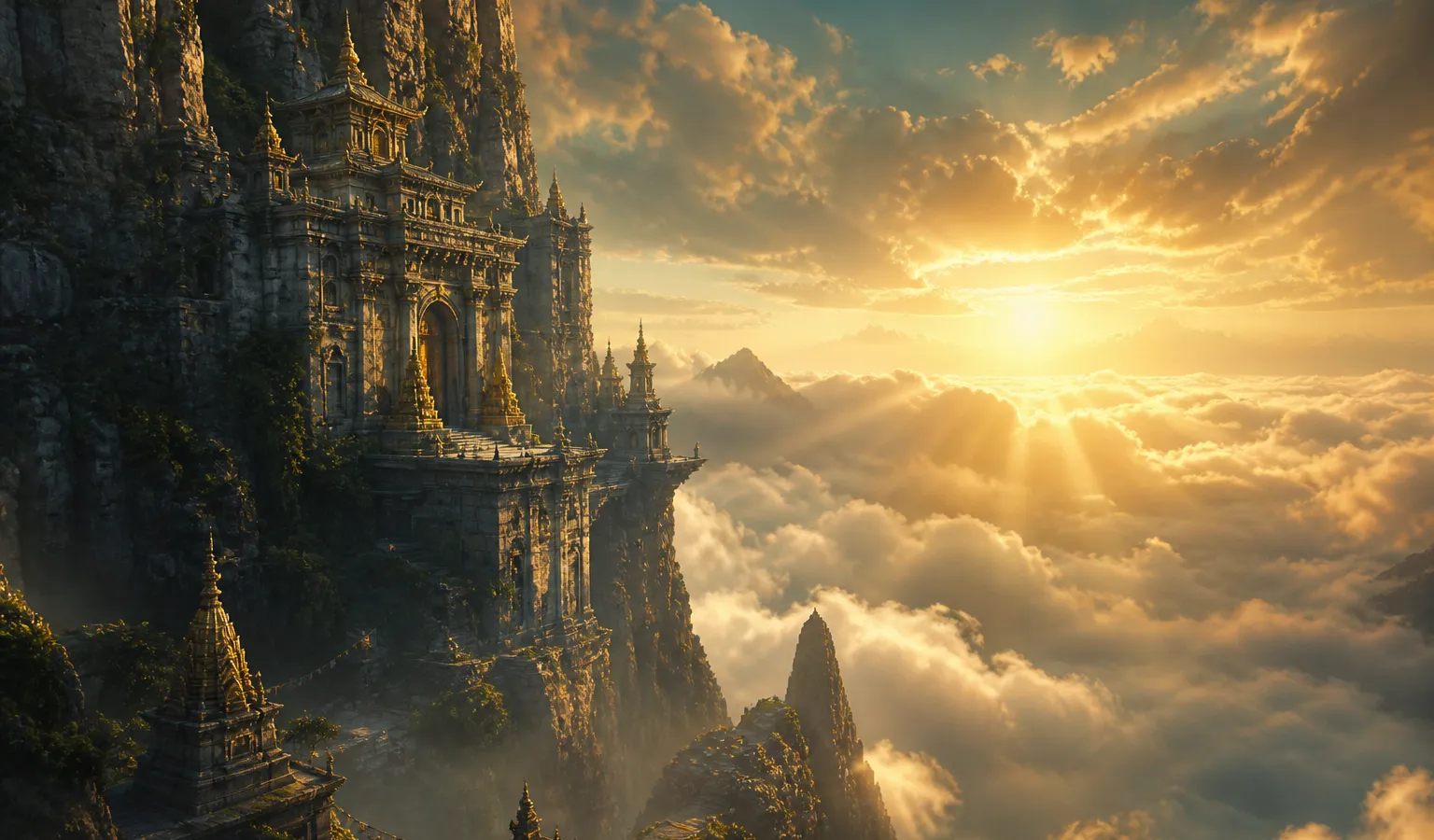
ancient cliffside temple above a sea of clouds at dusk, ultra-wide establishing shot, volumetric god rays, mossy stone, cinematic atmosphere, fantasy concept art --chaos 25 --stylize 150General scene library: Midjourney Prompt Case Library: 10 Ready-to-Adapt V8.1 Scene Templates.
Example 7: Brand series (short prompt + style anchor)
Best for: social grids, unified account visuals
Tip: lock SREF / Moodboards; swap only the subject in the prompt
minimal product hero on seamless light gray backdrop, centered packshot, soft even studio light, clean commercial photography --raw --stylize 55(In practice, attach a style reference in the UI instead of stacking more style adjectives.)
Example 8: Mood portrait with Personalization on
Best for: personal portfolios, long-term aesthetic archives
Tip: enable Personalization, raise --stylize moderately
a person sitting by a rainy window, medium shot, soft daylight, quiet mood, natural skin, intimate portrait photography --stylize 180Hands-on walkthrough: Midjourney Personalization in Practice: Train and Apply Your Aesthetic Profile.
Turn the Examples into a V8.2 Workflow
| Step | Action | Goal |
|---|---|---|
| 1 | Pick the closest example for your use case | Avoid building from zero |
| 2 | Swap only subject/scene nouns | Validate direction fast |
| 3 | Generate 4–8 SD candidates | Lock composition |
| 4 | Adjust one parameter or one phrase at a time | Keep changes traceable |
| 5 | Add --raw / tune --stylize as needed |
Improve control |
| 6 | Attach SREF / Moodboards for series work | Visual consistency |
| 7 | Small fixes with Vary / Remix | Refine details |
| 8 | Run as HD for ~2K delivery | Ship-ready output |
End-to-end flow: Midjourney AI Art from Start to Finish: The Complete 2026 Workflow (V8.1).
Common Mistakes and Fixes
| Mistake | Better approach |
|---|---|
Stack masterpiece, 8k, best quality |
Write structure + 3 verifiable details |
| Run every trial in HD | SD explore → Run as HD |
Copy --q 2 / --q 4 from V7 |
Use SD/HD strategy instead |
| Change prompt + chaos + stylize + reference at once | One variable per run |
| Style only, no subject | Subject and camera first, style last |
| Rewrite style prose for every image in a series | SREF / Moodboards / Personalization |
Extended beginner pitfalls: 10 Common Midjourney Beginner Mistakes (and How to Fix Them).
How This Fits the Rest of the Site
- Structure method: Midjourney Prompt Tips: A Structure Built for V8.1
- Parameter table: Midjourney V8.1 Parameter Cheatsheet: –hd –raw –chaos –stylize
- Topic case libraries: e-commerce / portrait / architecture / food / anime (see example links above)
- Image-to-image: Midjourney Image Reference in Practice: Controlled Variants from Reference Images
- Iteration: Midjourney Vary & Remix: Small-Step Iteration to Final Delivery
Once you have a theme, open the workspace from Try Midjourney at the top, confirm the model is V8.2 (or the current default V8 series), run Example 1 or 2 in SD, then Run as HD—that builds Midjourney prompt intuition faster than memorizing a parameter table.
Conclusion
The core of Midjourney V8.2 prompts is turning lucky rolls into a manageable brief: structure first, parameters matched to the task, SD for exploration, HD for delivery. Start from the 8 examples here, adapt the first subject line for your use case, then iterate with the site’s topic cases and tutorials—your text-to-image / AI art output will move steadily toward shippable finals.