Midjourney
Midjourney Miyazaki / Ghibli Style: How to Generate Warm and Healing Anime Landscapes
Midjourney.ing5 min read
Contents+
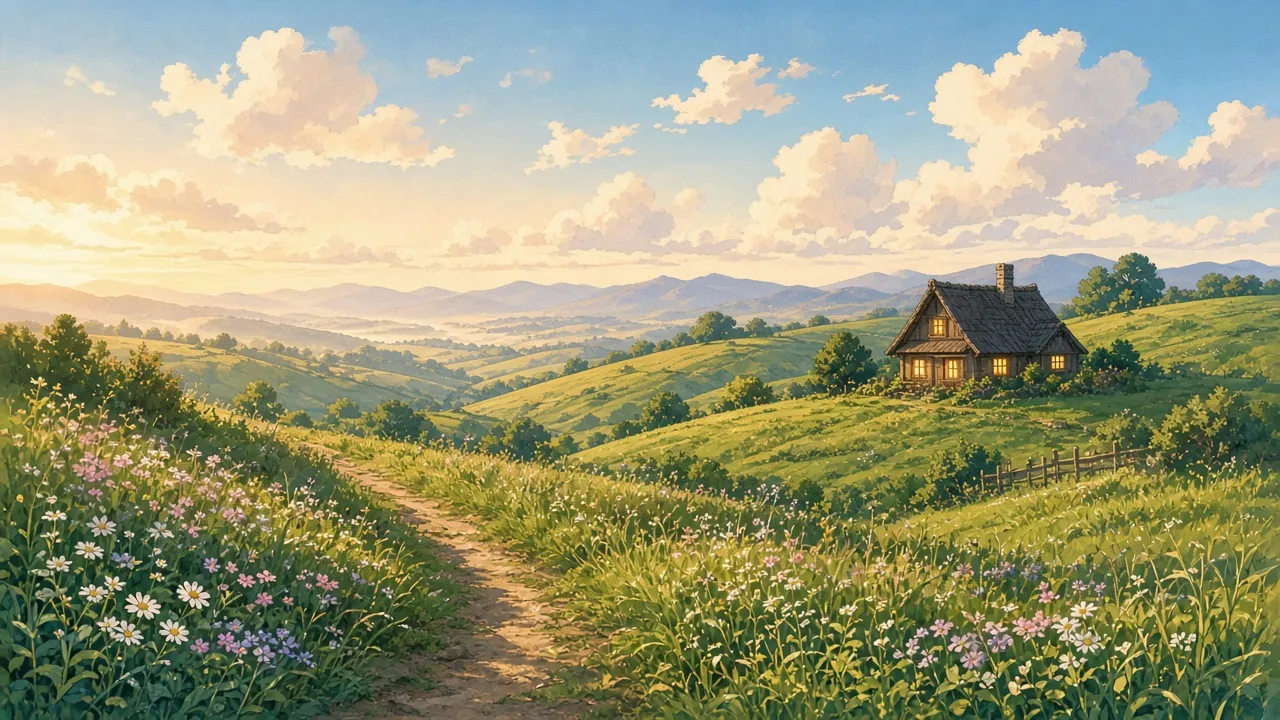
If you want Midjourney frames that feel instantly warm—the soft-hill, soft-cloud Miyazaki / Ghibli-style vibe—stacking masterpiece rarely helps. What works is naming the ingredients clearly: gentle light, breathable air, humble buildings, and one primary medium phrase. This guide focuses on warm, healing anime landscapes (hills, country roads, coasts, distant trains), with reusable Midjourney prompts and parameter habits tuned for Midjourney V8.2: explore in SD, finish with Run as HD.
Note: we are talking about a familiar hand-painted pastoral aesthetic associated with Miyazaki films / Ghibli backgrounds—not official branding or licensed assets. For character sheets and broader anime templates, see anime & illustration prompt cases. For a wider style menu, see the V8.2 aesthetic styles review.
What makes this look land in Midjourney
When you run Midjourney text-to-image for this aesthetic, prioritize five things:
- Soft light — golden hour, thin overcast, warm window glow; skip hard neon
- Air — mist bands, pollen, layered distant hills beat empty “8K” talk
- Landscape first — wide scenes; people, if any, are tiny accents
- One medium — pick
anime background artorsoft watercolor animeorhand-painted anime landscape - Usually no
--raw— Raw pushes photography and can bleach the painted warmth
Starter params: --stylize 200–280; raise --chaos briefly while exploring, then drop it. Onboarding: How to Use Midjourney V8.2. Resolution path: HD vs SD.
A reusable prompt skeleton
Useful order:
- Landscape subject — hills / coast / dirt road / train / rooftops
- Time & light — golden hour, soft morning light, gentle overcast
- Weather & air — fluffy clouds, light mist, breeze in tall grass
- Small accents — distant cottage, thin path, laundry line (one or two max)
- Medium — hand-painted anime landscape / soft cel-shaded background art
- Mood (light touch) — warm, peaceful, nostalgic—do not dump ten adjectives
- Params — no
--raw;--stylize 220–260
Cover-adjacent starter
hand-painted anime landscape of rolling green hills under soft golden-hour light, fluffy white clouds, a distant wooden cottage with warm window glow, winding dirt path through tall grass and wildflowers, peaceful pastoral atmosphere, warm healing mood --stylize 240Run a few light/weather variants in SD, then Run as HD on the winner. Full loop: 2026 AI art workflow.
8 ready-to-adapt healing landscape templates
1. Hills and cottage (social-cover friendly)
anime background art of gentle hills and a small cottage at golden hour, soft rim light on grass, fluffy clouds, quiet countryside, hand-painted look --stylize 2402. Cliff, sea, and lighthouse
hand-painted anime seascape, grassy cliff above calm blue water, white lighthouse in the distance, soft sea breeze, bright but gentle daylight, healing atmosphere --stylize 2303. Country road and wildflowers
soft watercolor anime landscape of a dirt country road lined with wildflowers, distant mountains in haze, summer afternoon light, nostalgic and warm --stylize 2504. Town roofs after rain
anime townscape after light rain, wet tiled roofs reflecting soft sky, distant green hills, gentle overcast light, cozy hand-painted background art --stylize 2205. Forest stream and stone bridge
hand-painted anime forest stream with a small stone bridge, dappled sunlight through leaves, clear water, mossy rocks, peaceful healing mood --stylize 2406. Distant train at dusk
wide anime landscape with a distant train crossing green fields at dusk, warm orange sky, soft clouds, quiet rural horizon, painterly background art --stylize 2307. Spring fields and cumulus
anime countryside in spring, bright green rice fields, towering fluffy cumulus clouds, soft wind, clean pastel palette, warm healing anime background --stylize 2508. Night meadow cottage
nighttime anime landscape of a lone cottage in a meadow, warm yellow windows, deep blue sky with soft stars, gentle moonlight on grass, cozy hand-painted look --stylize 240Change only time/light or the accent building per round. For a channel series, lock winners with SREF / Moodboards (style reference guide).
Parameters and common failures
| Symptom | Likely cause | Fix |
|---|---|---|
| Turns into photo landscape | --raw on or photo tokens |
Disable Raw; stress hand-painted anime / anime background art |
| Cyber-neon mood | Neon / cyberpunk lighting language | Switch to soft golden hour / gentle daylight |
| Busy, not healing | Too many props, high chaos | Delete accents; lower --chaos |
| Style jumps every image | No style lock | Enable SREF; keep one medium phrase |
| Dead air / fake clouds | Only “ultra detailed” | Add fluffy clouds, light mist, atmospheric perspective |
More anime pitfalls: beginner mistakes. Prompt craft: prompt tips, V8.2 prompt guide. Still choosing a model for anime work? See best anime AI image models 2026—landscapes also benefit from Midjourney’s illustration-friendly defaults.
Make the healing look repeatable
- Win 1–2 SD directions from the templates above
- Run as HD for cover-grade stills
- Build SREF from winners; change only place and weather afterward
- Add tiny figure silhouettes later with image reference if needed (image reference guide)
- Cheatsheet: V8.1 parameters (current set for V8.2 too)
Closing
Midjourney Miyazaki / Ghibli-style landscapes are mostly warm light + air + humble narrative space—not a pile of trademark words. Keep the medium clear, leave Raw off, explore in SD, and finish with Run as HD, and you can ship consistently warm anime landscapes.
Next: run the cover-adjacent prompt, then swap in coast or train variants. Test your real brief on Midjourney.ing. For characters, keep using anime prompt cases; for a broader aesthetic board, see the 25-prompt style review.